
June 11, 2026 · All agencies
Certification History, PHQ Updates & a New Admin Role
This release focuses on clarity and control: clearer insight into an applicant's PHQ certification history, updated PHQ content in Section 5 (including alignment updates for CA POST agencies), and a new Admin role with expanded permission controls that gives your agency more flexibility in how administrative access is delegated.
These updates will be applied automatically. There is no action required on your part, though agencies interested in the new permission controls can adopt them whenever they're ready.
Here's what's included:
PHQ Certification History
We've improved the PHQ Certification History (also known as the "Changes Tracking Report") to make it easier to review an applicant's PHQ certification activity across agencies. The report still tracks changes the applicant has made to their answers when applying to various agencies. This update improves how that information is presented.
What's new
- Clearer organization: Certifications are now grouped by date, so you can see at a glance which agencies received a certification on the same day. When an applicant certifies jointly to multiple agencies, those agencies appear together in a single dated group.
- Simpler instructions: We've rewritten the in-view guidance and added a "Learn More" link that explains what you're seeing, including why other agencies' certifications may appear in the list and what the PHQ and Changes links show you.
- Clearer comparisons between PHQs: Clicking the "Changes" link compares answers between the PHQ the applicant certified to your agency (indicated by a green checkmark) and the other certification you select from the applicant's history.
- Viewing other agency PHQs: Clicking the "PHQ" link next to a certification opens the entire PHQ the applicant submitted to that agency, with that agency's name shown in the PHQ header.
- "Reason for Update" response: When re-certifying a PHQ, an applicant can supply a reason for their changes. That reason is only relevant when comparing two certifications that happened back to back. When you compare non-consecutive certifications, the "Reason for Update" field now explains that no reason applies, rather than showing information that doesn't fit your comparison.
PHQ Updates (Section 5: Experience and Employment)
Update 1: New "email" field for prior employer
Affects all PHQ versions. Applicants can now include an email address for a prior employer. This is meant to be the general contact information for the employer and accompanies the existing address and phone fields. Applicants are not required to enter an email address here, and they can continue adding prior employer contacts (such as supervisors and coworkers) as they always have.
Update 2: Question and instructions updated (CA POST agencies only)
We've updated the Section 5 (Experience and Employment) instructions and Question 7 to better align with CA POST requirements. This update applies only to the CA POST 2-251 PHQ.
Before
Instructions — Public Safety Agencies
"List EVERY agency you have applied to, starting with the most recent. All agencies MUST be listed regardless of the outcome or current status. If you have applied more than once to the same agency, list each occurrence separately. Give complete and accurate addresses."
Question 7
"Have you ever applied to any Public Safety Agencies? (Police Department, Sheriff's Office, Fire Department, etc.)"
After
Instructions — Law Enforcement Agencies
"List EVERY agency you have applied to. All agencies MUST be listed regardless of the outcome or current status. Check all boxes that apply for each agency. If you applied more than once to the same agency, list each occurrence separately. Give complete and accurate addresses."
Question 7
"Have you ever applied for any position at this or any other law enforcement agency (city, county, state, or federal)?"
Application status: When an applicant enters a previous agency they applied to, they are asked to mark the status of that application. Since the CA POST 2-251 does not include the "pending" option for application status, it has been removed from the CA POST 2-251 PHQ version.
Answer history tracking: Answers for Question 7 will not track between the standard Guardian PHQ and the CA POST version, since one asks for all Public Safety agencies and the other asks for only Law Enforcement agencies. However, if an applicant answers this question on a CA POST 2-251 PHQ, that answer will track and transfer to other CA POST 2-251 PHQs.
Admin Role and Expanded Permission Controls
Guardian now offers a dedicated Admin role and a more granular set of extended permissions, giving your agency greater flexibility in how you delegate administrative functions and align user access with CJIS and other regulatory policies.
What's new
- New Admin role: When creating a new user, you can now select "Admin" as a role. Admin accounts are designed for administrative functions (managing personnel, agency settings, and the activity log) and come with those permissions enabled by default, while operational permissions (investigations, triage, applicant management) are off by default. This lets your agency separate administrative duties from day-to-day investigative work — whether those duties belong to a different person or to the same person using a separate account.
- More granular extended permissions: Several functions that were previously available to all Supervisors by default (access to Agency Settings, Activity Logs, and Personnel Manager) are now individually controlled extended permissions. You can enable or disable each one per user, giving you precise control over who can do what.
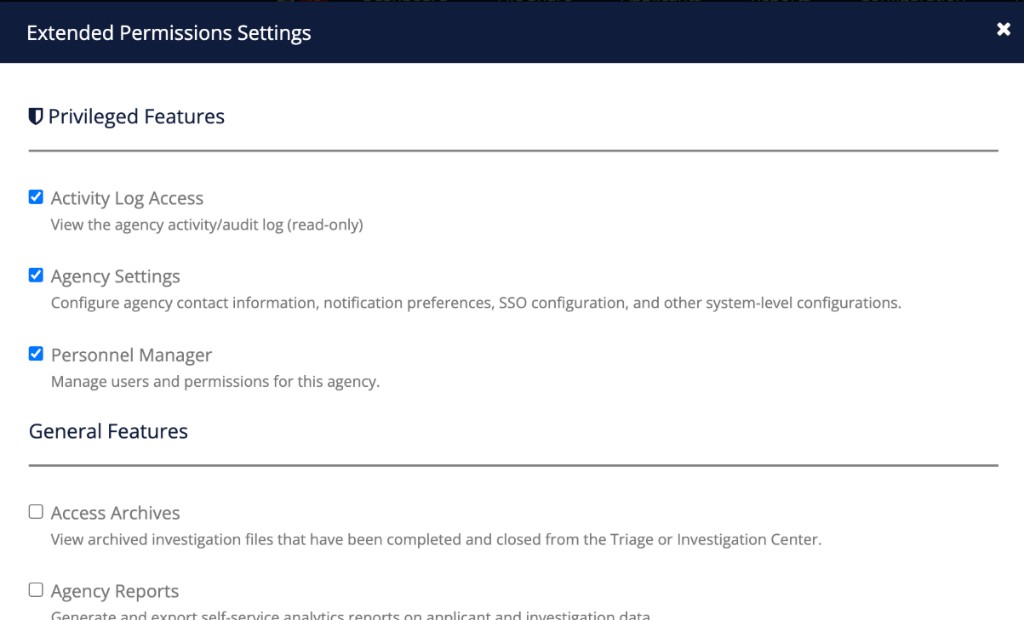
The new Extended Permissions Settings, where privileged features such as Activity Log Access, Agency Settings, and Personnel Manager can be enabled or disabled individually for each user. - Privileged access indicators in Personnel Manager: Users who hold privileged permissions are now visually identified in the Personnel Manager with a yellow-orange bar and a small shield icon. This makes it easy to see at a glance which users have administrative access — especially useful when conducting access audits.
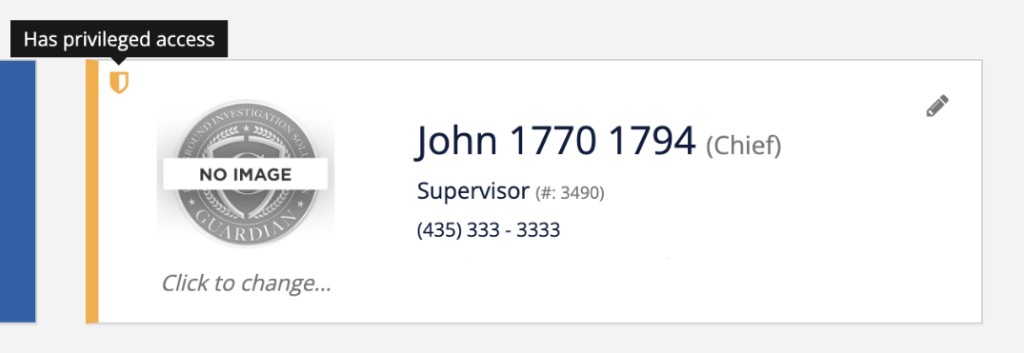
Current Supervisor accounts keep all the permissions they have today, including administrative functions. If your agency chooses to separate administrative and operational access, you can create an Admin account and then remove administrative permissions from other accounts at your own pace. Guardian provides the flexibility; your agency decides how and when to use it.
Thanks for reading — and thanks, as always, for partnering with us.
Questions? Reach our support team at support@guardianalliancetechnologies.com